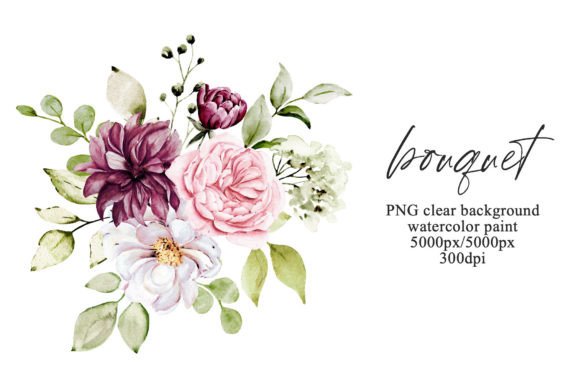
Embrace Soft Elegance with Watercolor Peony Bouquets
There is something undeniably timeless about a peony. The lush, layered petals and the way the colors bleed softly from the center to the edges evoke a sense of romance and sophistication that few other flowers can match. When you capture that organic beauty in a medium like watercolor, the result is a design asset that feels both artistic and authentic. This specific collection of floral art brings that ethereal, hand-painted aesthetic directly into your digital toolkit. It is not just a static image; it is a piece of visual storytelling waiting to happen.
The appeal of the "Bouquet Wit Watercolor Flowers Peonies" lies in its versatility. The soft edges of watercolor art avoid the harsh lines often found in vector graphics, offering a more organic and approachable feel. Whether you are working on a delicate wedding invitation or a bold marketing campaign, the composition of pink peonies provides a focal point that draws the eye without overwhelming the surrounding text or design elements. Because the artwork is delivered as a high-resolution PNG file (5000px x 5000px at 300dpi), you have the freedom to scale it for large format printing or crop in tight for small digital details without losing quality. The transparent background is the key feature here, allowing the bouquet to float seamlessly over any texture, color, or photograph you choose.
Why Watercolor Elements Elevate Modern Branding
In an era where digital perfection is the norm, audiences are increasingly drawn to designs that feel human and tactile. This is where watercolor floral clipart shines. Using hand-painted elements like these peonies can instantly soften a brand's identity. For small business owners—especially those in the lifestyle, beauty, wellness, or wedding industries—this style of imagery signals care, creativity, and attention to detail.
Imagine a bakery's branding. A sharp, geometric logo might feel too industrial, but pairing a clean sans serif font with a splash of soft pink watercolor peonies creates a balance between professionalism and warmth. The same applies to social media graphics. In a sea of high-contrast, text-heavy posts, a subtle floral overlay or a corner arrangement of these peonies can stop the scroll. It creates a visual "breath" that makes content feel more curated and less cluttered. This isn't just about making things look "pretty"; it's about using visual cues to tell your audience that your brand values aesthetics and quality.
Practical Applications for Your Next Project
The utility of high-quality floral assets extends far beyond simple decoration. When you have a file of this resolution and clarity, it becomes a foundational element for various types of design work. Here are a few specific scenarios where this asset can solve design problems or enhance your workflow:
- Digital Invitations and Stationery: For wedding planners or DIY brides, these peonies are perfect for save-the-dates, RSVP cards, and menu designs. The soft pink tones are classic choices for spring and summer events, but they can also be used to brighten up winter themes.
- Presentation Backgrounds: Corporate presentations often suffer from being too dry. Adding a faint watermark of watercolor flowers to the corner of your slides can make the material feel more engaging without distracting from the data.
- Merchandise and Packaging: If you sell physical products, consider how this bouquet would look on a tote bag, a notebook cover, or product packaging. The high DPI ensures that the printed result will look like an original painting rather than a pixelated computer graphic.
- Scrapbooking and Art Prints: For the hobbyist or the digital artist, these elements are perfect for creating composite art prints or journaling pages. The "ready to use" nature of the file means less time masking and more time creating.
Integrating Florals with Typography
One of the most common challenges in design is balancing imagery with text. When using a busy or detailed background like a floral bouquet, readability is paramount. The key is contrast and placement. Because this particular image features soft pinks and whites, it works best when paired with darker text colors like charcoal, deep navy, or black. If you prefer a lighter aesthetic, use the bouquet as a distinct element separate from your text blocks rather than a background layer.
Font pairing is also critical here. Since the artwork is organic and flowing, you have two distinct paths. You can lean into the elegance by pairing the flowers with a refined serif typeface or a flowing script font. This works well for wedding invitations or luxury branding. Alternatively, you can create a modern juxtaposition by placing the watercolor art alongside a bold, geometric sans serif font. This contrast highlights the artistic nature of the flowers while keeping the overall look contemporary and clean.
Technical Tips for Best Results
While the file is ready to use, there are a few technical considerations to keep in mind to ensure the best final product. First, always check your color mode. If you are designing for web or social media, RGB is standard. However, if you are sending this to a professional printer for brochures or posters, ensure your document is set to CMYK. As noted, colors may appear slightly different across various screens, so doing a test print on your home printer before a large run is always a wise move.
Second, consider the "transparent background" feature your best friend. It allows you to layer the peonies over complex textures, such as kraft paper for a rustic look or marble for a modern luxury vibe. You can also duplicate the layer and flip it horizontally to create a wider, symmetrical arrangement for banners or headers. By experimenting with opacity, you can turn this bright, bold bouquet into a subtle texture that adds depth to your design without competing for attention. Ultimately, this asset is designed to be a workhorse in your creative library, offering endless possibilities for adding a touch of botanical elegance to any project.